
Showing posts with label math. Show all posts
Showing posts with label math. Show all posts
Monday, November 11, 2019
Robocompass
I know you've always wanted an easy way to construct shapes with a compass on the computer. Well, now you can with robocompass.com! Seriously, this is pretty cool.

Monday, May 13, 2019
Science & Math Animated GIFs
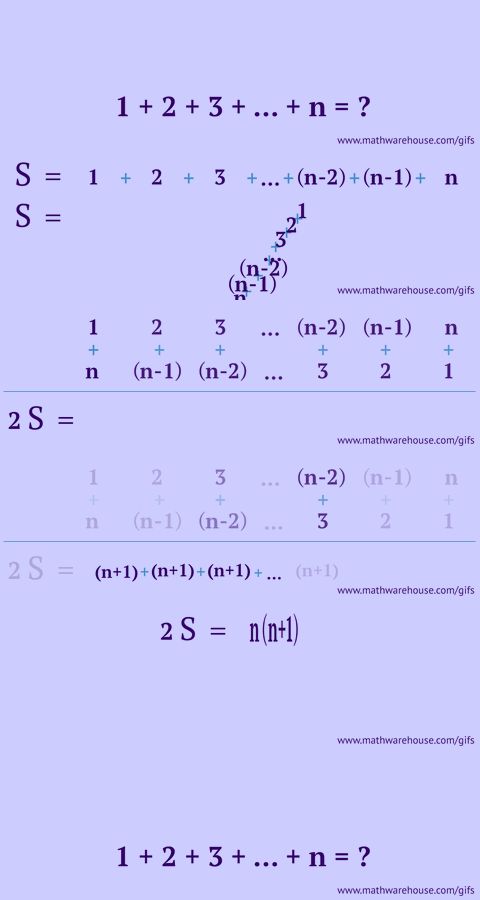
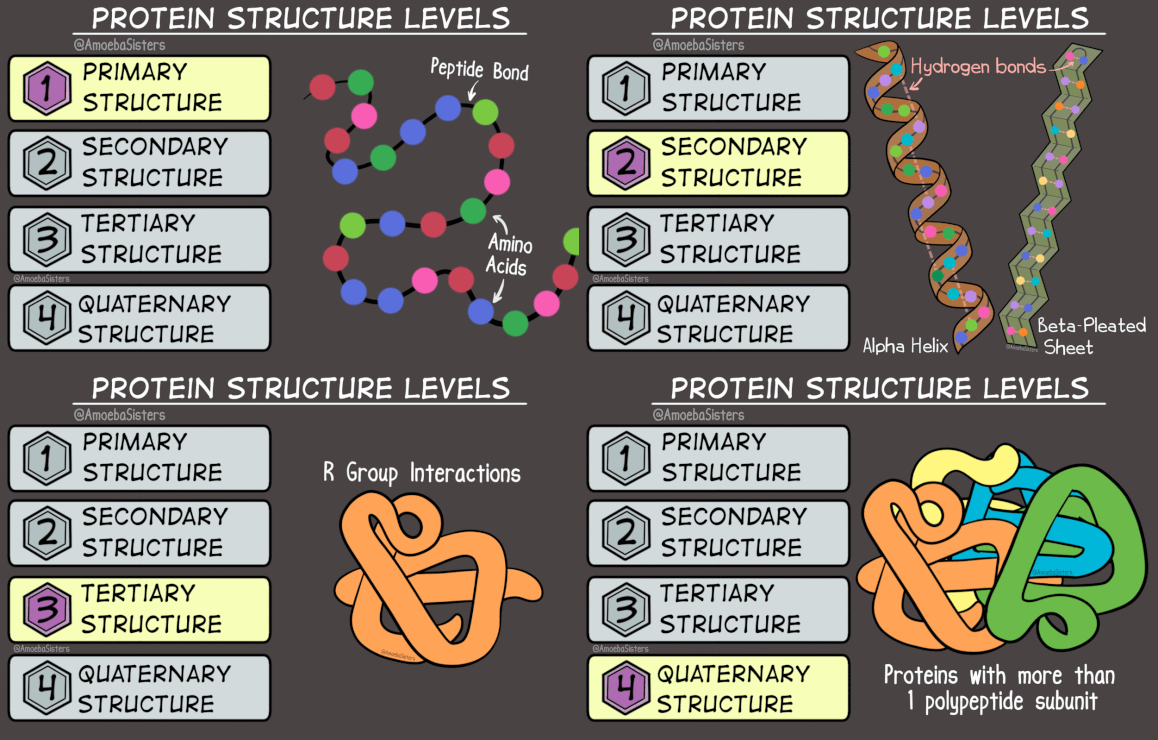
Check out these fun sites with animated GIFs to help explain math and science concepts. The science website also has information about how to get your students to create their own animated GIFs over topics covered in your class.
Math: www.mathwarehouse.com/animated-gifs
Science: www.amoebasisters.com/gifs.html
Monday, January 22, 2018
Math: EquatIO now includes graphing from Desmos
This article and the video above tell more about how EquatIO (formerly g(math)) and Desmos now work together. The EquatIO Chrome Extension allows users to easily add math equations and graphs into most Google things.
To access EquatIO, add the Chrome extension found here. Then open a Google Doc, Form, Sheets, Slide, or Drawing to use the extension. You may need to reboot the computer if it doesn't work correctly right away.
Monday, May 8, 2017
10 Math YouTube Channels Not Named Khan Academy

Richard Byrne at Free Tech 4 Teachers compiled a list of 10 Math YouTube Channels Not Named Khan Academy. Some are more elementary but several include high school level content. Read more.
Monday, January 2, 2017
12 Excellent Add-Ons for Google Docs

This list of 12 excellent add-ons for Google Docs is worth your time! It includes details on:
- Revision History Analytics
- SAS Writing Reviser
- Easy Accents
- g(Math)
- Translate
- Highlight Tool
- Rhyme Finder
- Word Cloud Generator
- Pupil Pref
- Doc Tools
- Orange Slice Teacher Rubric
- EasyBib
Monday, December 12, 2016
20 Chrome Extensions, Web Apps, & Add-ons for Math

I recently came across this list of 20 Chrome Extensions, Web Apps, & Add-ons for Math. A few are geared toward elementary but there are several that could be helpful at the high school level. Take a look!
Monday, October 3, 2016
Math and Logic Problems

Monday, September 12, 2016

Monday, March 14, 2016
Graphite's List of Math Apps

Common Sense Graphite put together this list of math apps. Several include high school content. Read more
Happy Pi Day! #PiDay #PiDay2016
Monday, February 1, 2016
Pixar in a Box

Pixar in a Box is a collaboration between Pixar and Khan Academy. Each topic begins with a design focused lesson which is appropriate for grades 5+, followed by a math focused lesson which is grade specific. Our lessons touch on concepts ranging from grade 4 through high school and beyond.
Explore how realistic blades of grass are modeled
using parabolic arcs.
Explore how clay models are transformed
into digital characters using weighted averages.
Explore how swarms of robots were created for WALL-E
using combinatorics.
Explore how animators bring characters to life with
the help of Animation
curves.
Explore how virtual sets are constructed using geometric transformations.
Explore how pixels are painted by solving systems of linear equations.
Environment Modeling
·
Lesson 1: Modeling grass with parabolas - all
ages
·
Lesson 2: Calculating parabolas - grades 7 - high school
Character Modeling
·
Lesson 1: Modeling with subdivision surfaces - all
ages
·
Lesson 2: Mathematics of subdivision - grades
7 - high school
Animation
·
Lesson 1: Introduction to animation curves - all
ages
·
Lesson 2: Mathematics of animation curves - grades
8 - high school
Crowds
·
Lesson 1: Building crowds (combinations) - grades
4-7
·
Lesson 2: Counting crowds (binomial coefficient) - high
school
Sets & Staging
·
Lesson 1: Geometric transformations - grades
7-8
·
Lesson 2: Mathematics of rotation - high
school
Rendering
·
Lesson 1: Rendering 101 - all ages
·
Lesson 2: Mathematics of rendering - high
school+
Monday, January 11, 2016
Math Video Resources
This year our math department has new curriculum. These videos do not match the new curriculum's way of teaching concepts but they may be helpful for struggling students. Feel free to use and share these!
WOWmath.org’s Playlists
covers Algebra II, AP Calculus AB, AP Calculus AB Practice Problems
Math Doctor Bob
covers Algebra I & II, Calculus, Statistics, Geometry and more
Numberphile
fun math facts
YayMath includes Algebra I & II, Geometry, Statistics
Monday, December 14, 2015
g(Math) [add-in for Google Forms] now has standalone Handwriting entries
Monday, November 16, 2015
TED-Ed: Superhero Science and more cool topics
Superhero Science is a playlist of science lessons
published by TED-Ed. The lessons in the playlist feature explanations of what
would happen in various scenarios if you had superhero powers like flight,
strength, and speed. Each lessons explains the mathematics and science of
scenarios frequently found in superhero stories. For example, in the lesson on
strength we learn what would happen if a superhero did catch someone falling
from the top of a skyscraper.
On that same link, there is alist of all the other TED-Ed lesson series that are available. Some
fantastic stuff!
Actions and Reactions
Animation Basics
Awesome Nature
Before and After Einstein
Behind the Curtain
Click You Fortune
Cyber-Influence & Power
Discovering the Deep
Ecofying Citites
Everyone Has a Story
Exploring Theories
Getting Under Our Skin
Government: Declassified
How Things Work
Ingenuity in the Developing World
Inventions that Shape History
Making the Invisible Visible
Mastering Tech Artistry
Math in Real Life
Mind Matters
Mysteries of Vernacular
Our Changing Climate
Out of This World
Periodic Videos
Playing with Language
Questions No One (Yet) Knows the Answers To
Reading Between the Lines
The Artist's Palette
The Big Questions
The Way We Think
The World's People and Places
The Writer's Workshop
Things they Don't Teach in School (But Should)
Troubleshooting the World
Visualizing Data
What Will You Do with Your Life?
You Are What You Eat
You Graduated... Now What?
If you have never used TED-Ed
before, if you create a FREE teacher account, you can customize the questions
and activities that go with the videos and you can assign them to your
students.
Let me know if you are
interested in learning more about it. I’d be happy to help set it up.
Tuesday, May 12, 2015
Desmos: Explore Math

Desmos
What it is: Desmos is an incredibly fast online calculator that can graph any imaginable function. It also allows users to add sliders, do regressions, and plot whole data tables, among other things.
Who would love it: Anyone learning math, from middle and high school through graduate school and beyond. Also great for teachers.
Why it’s good: Desmos can be used on any computer or tablet, completely free of charge, and does not even require a download. It seamlessly creates beautiful visual representations and animations, and it allows users to save and share graphs they've created. Desmos makes complex math — whether theoretical or applied — fun, interactive, and accessible.
Why it’s relevant: For many students and math enthusiasts who can't afford graphing calculators, Desmos is leveling the playing field. It is also, in Tech Crunch's words, "platform-agnostic" — so anyone with a computer or tablet can use it anytime. In addition, Desmos is supporting the push toward online textbooks and leading many students to spend their free time creating cool graphs and cultivating a love of math — something that's especially crucial given the growth in STEM-related careers.
Something you didn’t know: The site has an engaging series of classroom activities for teachers. One of these is the Function Carnival, which enables students to watch a video, create a graph, and have that model transformed into an animation. Another is Des-Man, in which students do math artistically — they draw faces with graphs by using domain and range restrictions.
Friday, February 20, 2015
Friday, February 6, 2015
Khan Academy revisit
Khan Academy has grown over the past several years and now includes even more subjects. Check out the full list:

Khan Academy also now includes not just videos but also interactives, assessments, articles, handouts and more!
Friday, January 23, 2015
PBS Learning Media

PBS Learning Media now offers over 100,000 digital resources in its library for educators!
Read this article for more information or access PBS LearningMedia directly.
Tuesday, December 16, 2014
Plot.ly: graphing in education

Finally: a scientific graphing tool for students
and teachers. Import data from experiments or enter it manually into an online
spreadsheet. Make scatter plots, bar charts, lines-of-best fit and much more.
Check out our quick-start
to make your first Plotly graph!
Types of charts:

Thursday, December 4, 2014
GeoGebra

“GeoGebra is dynamic mathematics software for
all levels of education that brings together geometry, algebra, spreadsheets,
graphing, statistics and calculus in one easy-to-use package.”
It looks worth investigating more…
From today's Google for Education newsletter:
Rockin' around the Geome-TREE
|
Educator Tom Rose of Chowchilla High School in California uses
Geogebra,
a free web app, to bring complicated math concepts to life.
“The app’s ability to move things around and dynamically see what changes and what doesn’t goes much further than the most well-written lecture notes,” Rose says. “Students love working with GeoGebra, and have no problem loudly saying ‘YES!’ when I tell them it’s ‘a GeoGebra day’ rather than another slideshow from Mr. Rose.” |
 |
Subscribe to:
Posts (Atom)