Showing posts with label digital presence. Show all posts

Monday, November 15, 2021

Cleaning up your digital footprint

TCEA recently posted HOW TO AVOID TRAGEDY BY CLEANING UP YOUR DIGITAL FOOTPRINT. I highly recommend that you take a look at the article then spend some time cleaning up your digital footprint. You should revisit this every year or two!

It's a good idea to also talk with your classes about their digital footprint. You don't have to be an expert to have conversations about best practice online!

Monday, April 15, 2019

Internet Security 101 from TCEA's TechNotes


TCEA's TechNotes recently posted this article titled "Internet Security 101: What Teachers and Students Need to Know". Just because you don't teach in a computer lab all the time doesn't mean you're off the hook for understanding internet security and it's not as hard as you may think. Read more.

Monday, August 28, 2017

Google's Digital Safety Resources


Google launched their Digital Safety Resources for educators in June. The list includes resources for educators personal learning and for use with students in the classroom. Add this to your list of Digital Citizenship resources and, as always, see Penney Matos and Tammy Turner for additional support!

Monday, September 26, 2016

5 Video Tutorials to Teach about Online Safety


Educational Technology and Mobile Learning compiled this list of videos from the Google Safety Center. They can be very quick and useful ways to remind students of how to be safe online. Read more. 

Saturday, July 9, 2016

Monday, May 9, 2016

Article: What Educators Need to Know About Technology Addiction


Common Sense Media recently published an article titled "What Educators Need to Know about Technology Addiction". It includes a summary of recent survey findings and some suggestions of what can be done. If you're for or against technology use in the classroom, you should take a look. This is a real problem.

Monday, April 11, 2016

Monday, November 2, 2015

Library/Tech Exbooo Resources

Thank you to everyone who was able to make it by the Library/Tech Exbooo on Friday. Please click here for the information that was shared at the stations: (1) Learning Hub, (2) Google Apps, (3) Digital Citizenship, (4) Google Classroom

As always, please let Penney Matos and Tammy Turner know if there's anything we can do to help support you and your classes!


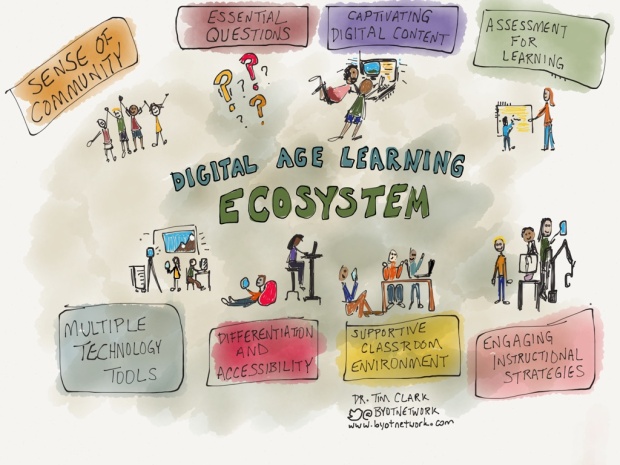
Components of a Digital Age Learning Ecosystem


This is an interesting article on the Components of a Digital Age Learning Ecosystem. It gives a short explanation of each of the ecosystem pieces as the author sees them.

If you are interested in discussing this topic, or anything else related to the use of technology in your class, please let Penney Matos know!

Monday, September 28, 2015

Best Practices for a Digital World

A "Best Practices for a Digital World" block has been added to all Student Learning Hub courses at Centennial HS. These tips will change every day.

Encourage your students to read these every time they log in!


If you run across any graphics, websites, etc. that would be good additions to the glossary it pulls from, send them to Penney Matos!

Tuesday, March 17, 2015

Report Cyberbullying

The Cyberbullying Research Center has compiled a comprehensive list of ways to report cyberbullying through a variety of sources. The link was added to the Student Tech Tips: Digital Awareness Tips page. Please share!


Wednesday, November 5, 2014

Friday, October 3, 2014

Google Educator Training


If you're interested in learning more of what Google can offer your classroom, check out Google's Educator Training. It includes some great training tools and even certification!

Wednesday, October 1, 2014

October: National Cyber Security Awareness Month


As educators, it's our responsibility to talk with our students about cyber security and digital presence. Below are helpful resources and formal lessons that you can use in your class, but not all discussions about cyber security and digital presence need to be formal ones. Even reminding students to be careful and think before they post something counts!

Helpful websites:
StaySafeOnline.org's Middle & High School
Common Sense Education's Digital Literacy & Citizenship
Stop Think Connect guide
StopThinkConnect.org
YouTube's Copyright resources

Handouts and video:
9-12 Grade Tip Sheet
NET CETERA's Guide to Chatting with Kids about Being Online
Cybersafety video

Lessons (10-20 minutes each)
Go to... Eduphoria's Forethought
Scope & Sequence (#1)
High School: Digital Citizenship: Digital Citizenship Lessons (#2)
Select the topic (#3)
Select the related resources (#4)
Look through the lesson and attachments (#5)