Showing posts with label chromebook. Show all posts

Monday, February 28, 2022

Enjoy Your Chromebook More


If you're looking for ways to customize your Chromebook, check out this post from TECA. Keep in mind that students and staff cannot add stickers directly to their FISD Chromebooks. You can, however, purchase a thin case to cover with stickers if you'd like. Read more.


Monday, November 29, 2021

Google's Note-taking tool Cursive


Users with touchscreen devices running Chrome have access to Google's Cursive for note-taking! I think it's so super cool! Check out TCEA's post about it!


Monday, January 27, 2020

Chromebook Shortcuts


Want to save some time? Learn these handy Chromebook keyboard shortcuts! The list includes how to restore closed tabs, how to scroll with one hand, and several other helpful shortcuts and tips! Read more.

Monday, January 13, 2020

Chromebook App Hub


Google for Education has put together this awesome resource for educators: Chromebook App Hub. Filter ideas by idea category, age range, subject, and learning goal and filter apps by app category, age range, and language. I recommend you bookmark the site and visit often! 

Monday, December 2, 2019

How to use Chromebooks Offline

Matt Miller from Ditch That Textbook recently posted about using Chromebooks offline. This comes in handy for students who do not have internet access at home and for the rare occasions that our network goes down. He includes information about how to set it up, apps to use, and some lesson planning ideas. Check it out! 
Read more.

Monday, August 26, 2019

How well do you know Chromebooks?


Really. How well do you think you know chromebooks? Can you scroll without using the scroll bar? Can you locate files after they're downloaded? These questions and more are part of this Chromebook Quiz for Students. I recommend you give it a try yourself!
Make a copy of the quiz.

Monday, August 19, 2019

Monday, May 8, 2017

Google Lit Trips on Chromebooks


If you are not familiar with them, a Google Lit Trip plots locations from a novel on Google Earth to create a 3D geographic tour of the story. At each location the Lit Trip can also include annotationsweb linksimagesvideosactivities, and more, all related to that part of the story. This is a great way to put students in the story, helping them see where the events took place, and bring the story to life.

Google Lit Trips are now available on Chromebooks! Check out this article with screenshots and directions. 

Monday, April 24, 2017

Monday, December 12, 2016

21 Chrome Extensions for Struggling Students and Special Needs


Check out this list of 21 Chrome Extensions for Struggling Students and Special Needs. There are several helpful Chrome extensions that you may want to investigate further. The list includes Test-to-Speech extensions, Readability extensions, Reading Comprehension extensions, Focus extensions, & Navigation extensions. 

Monday, November 30, 2015

3 Best Training Sessions for Educators using Google Apps

Google Gooru recently posted their 3 Best Training Sessions for Educators using Google Apps. The list includes (1) A Deep Dive into Google Classroom, (2) Automate the Grading Process with Flubaroo, and (3) The Benefits of Deploying Chromebooks. I recommend you take a look!

Friday, May 15, 2015

LucidChart's New Presentation Mode

LucidChart is a mind mapping tool that recently added a presentation feature.
Check out Richard Byrne's (Free Tech 4 Teachers) tips for educational uses.


To access LucidChart, 
- Click New à More à Connect more apps…
- Search for and add LucidChart
- Click New à More à LucidChart

- New documents will show up on your Drive list.

Monday, April 20, 2015

Chromebook Tips Every Teacher Should Know


Chrome Extensions for Teachers

Here are a few handy Chrome extensions:

Time Warp kindly reminds you not to procrastinate when you need to get things done. 


SnagIt is a quick screen capture tool. With TechSmith SnagIt's Chrome App, you can screen capture, screen record, image edit and share. With TechSmith SnagIt's Google Chrome Extension, you can take screenshots or screen recordings of anything on your screen including your browser, desktop and applications you have running.  


For more ideas, check out this list: Chrome Extensions for Teachers

Friday, April 17, 2015

Chrome's Hidden Mute Feature


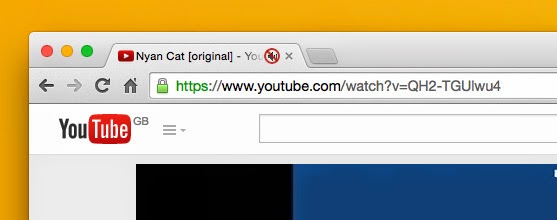
Don't you hate it when you have multiple tabs open and one of them starts playing music? Sometimes it can take a while to figure out which one you need to mute. This article explains how to activate Chrome's hidden mute feature, making it easy to mute tabs in the future.

Thursday, April 2, 2015

Find apps for your Chromebook

To help support your classroom use of Chromebooks, Google put together this list of "Find apps for your Chromebook". 

It’s a list of “If you want to… On a Chromebook, you could use…” and includes things like making a presentation, organizing notes, edit a video, create music and much more.

Let me know if you would like help exploring any of these!

Tuesday, March 31, 2015

Friday, February 6, 2015

Google Keep


Google Keep is basically post-its for your Google Account. You can color code them, mark items off, share them with others and more! 

Check it out:
On Android http://g.co.keep