
Here are my favorite finds from the TCEA (Texas Computer Educators Association) Convention…
Brain break/calming sites
Weave Silk (you can drag a color circle onto another and they blend, the faster your mouse moves the more it shows the 2nd color)
Color Mandala – very good for my symmetrical, organized brain!
Radial Timers
Much less stressful than the traditional bomb countdown!
Amazon’s Leadership Principles
Along the lines of what our students need to be Future Ready… These are the principles that Amazon leaders focus on every time they meet and in every decision they make. A trainer from Amazon shared these and stressed how they guide everything they do.
Canva Presentations
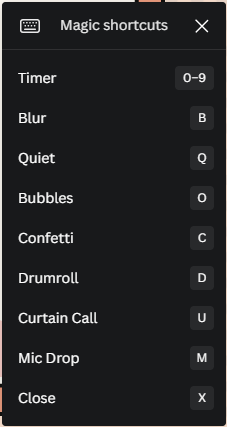
Magic Shortcuts - So fun! Create a quick Canva presentation then when in presentation mode, play with these:
Present and Record - You can record yourself giving the presentation!
If you don’t have a FREE educational Canva account, click here.
Canva for Education also includes a Classroom so you can manage your students and see their work! Adding students also gives them access to all of the additional FREE Educational resources.
Yellkey.com
Creates a shortened URL for a short period of time. Great for sharing a URL with students when it’s just needed for that time during class.
Crowd Buzzer
Turns devices (phones, chromebooks) into a buzzer. Great for class review games!
Teacher: https://ccg.buzz/host/
Students: https://ccg.buzz/
Gimkit update
KitCollab - students can create content; you can pull from it to use
Now the free account allows as many people as you want & includes basic game types
Wakelet
Wakelet is like Pinterest for education.
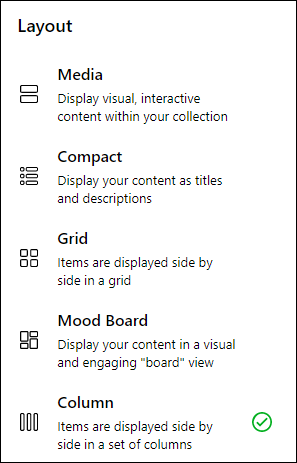
When creating a new board, select from several layout options.
Many types of items can be added to a Wakelet board.

Boards can be used as a template for students to add their own resources to
Boards can be collaborative for group work.
Ideas of use:
Backchannel during class
Keeping track of resources/research
Newsletters
Station work
Sub plans (example; great for subs who can’t log into Canvas)
Examples: Representation of Disability Through The Media and Fairytales, The 3 Branches of Government, Art in the Time of COVID-19, Digital Citizenship
Building Culture in your School/Classroom
Culture is built 30 seconds at a time.
Stand in halls during passing periods and talk with kids!
Congratulate students on accomplishments
Idea to build relationships:
Pull out your phone, open photos.
Find one to share and tell the story.
1 minute per person in pairs.
3 key findings that work with EdTech
Interactive learning
Use of tech to explore and create rather than to drill and kill
The right blend of teachers and tech


