

Showing posts with label assessment. Show all posts
Showing posts with label assessment. Show all posts
Wednesday, April 27, 2022
Replacing Exams with Performance Tasks

Monday, March 29, 2021
Kahoot Update: Double Authentication
Kahoot added a double authentication option to help cut down on outsiders receiving the code and joining games they don't belong in! Directions.
Monday, March 15, 2021
Kahoot Update: Question and Answers on Same Screen!
Kahoot recently added an option for the teacher to choose to display both the question and the answers on the students' screens! This is awesome! Students no longer have to look back and forth between 2 screens to interact with Kahoot.
Check out this video from Free Tech 4 Teachers to see how it works.
Monday, March 1, 2021
Formative Assessment Tools


Common Sense Media put together a quite inclusive list of formative assessment tools. If you're looking for a way to gather data and feedback from students, check them out. Keep in mind that the tool you select should also be on the list of FISD Approved Apps. If you would like a site evaluated to be added to the list, fill in the "Unblock/Block a Website/Online Application Approval" HelpDesk ticket and select "Online Application Approval".
I also recommend you check out their article titled "Make Formative Assessment More Student Centered.
Monday, April 8, 2019
TCEA's Formative Assessment list

Image by Wokandapix from Pixabay
TCEA recently made this blog post listing resources for Formative Assessment. See if any of these are a good fit in your classroom! Read more.
Monday, February 18, 2019
Ask Yourself, Why am I Grading This?

Caitlin Tucker recently posted this blog post about how she determines if she should grade an assignment/work or not. With how many things are on your plate these days, I think it's worth a read. It can help you prioritize and maybe even lessen your to-do list a bit! Read more.
Monday, February 13, 2017
Learning Hub: Quiz Group & User Overrides

If you're hesitant about assigning quizzes through the Learning Hub, you can set a different open/close date/time and a different password to each group of students (class, if you enroll them in groups by class) or for individual students who may have been absent or who have an IEP/504 accommodation for additional time. You can even set a different password for a student who may need their own password to access the quiz. See this handout for more on Adding Quiz Overrides.
Monday, January 23, 2017
Differentiation with Google Classroom

Google Classroom recently added the ability to select individual students for assignments. This makes it so much easier to differentiate and give specific assignments to specific students! Awesome!
Monday, January 2, 2017
Jeopardy.rocks

Have you ever watched vegetables try to answer Jeopardy questions? Jeopardy.rocks provides an easy game template to create Jeopardy games for your students. Better yet, have students create their own Jeopardy games to show off what they have learned.
Monday, September 12, 2016
Annotate PDFs, images, and more with Google Classroom app

Recently, Google added the ability to annotate on Google docs, images, PDFs and MS Office documents to its Google Classroom mobile app. This is awesome news for teachers and students wanting to annotate, especially from iPads, Google tablets, and both Android phones and iPhones. Read more:
Monday, May 16, 2016
Wizer.me: Blended Assignment Builder

Wizer.me is a new blended assignment builder. You can search through already created assessments or create your own. More are added every day.
Check out what Sara Isbell, FISD Digital Learning Coach, has to say about it. Read more...
Monday, May 9, 2016
BYOD Activities that Work

Help keep your students engaged these last few weeks of school. Check out this list of BYOD Activities That Work. As always, if you would like any help with any of these tools or ideas, please contact Penney Matos!
Monday, April 18, 2016

Monday, April 4, 2016
The 21st Century Book Report

I know not all of you teach English and if you do, you likely don't do traditional book reports often if ever, but everyone should read Adam Schoenbart's post The 21st Century Book Report. I especially like how he empowered his students to share their work with a world-wide audience. Check out the section titled "Sharing Student Work" to see their creations.
If you ever want help with having your students share their work outside our walls, let me know!
Monday, March 14, 2016
Formative Assessment Apps & Tips

Common Sense Graphite put together this short list of apps and a few resources that are helpful for formative assessment in your classroom. They recommend these apps: Poll Everywhere, Socrative, Kahoot or Formative.
I also ran across this article from Ms. EdTechie listing many more formative assessment options.
If you would like to talk about any of these apps or other formative assessment options, please let me know!
Monday, March 7, 2016
Google Classroom: Assignments

When adding an assignment in Google Classroom, if you are providing a template that you want students to type in and click Turn In when finished, the item you attach must be in Google Docs format and attach it using the Drive icon. Click on the picture above for a larger view.
Monday, February 22, 2016
"I got 99 problems but Tech ain't one" from #4OCF

I highly recommend you and your PLC team read over 4 O'Clock Faculty's article "I got 99 problems but Tech ain't one". Great discussion topic for educators. #4OCF
Monday, February 1, 2016
Kahoot: Ghost Mode

Kahoot is an assessment tool that can be used with BYOD or school owned devices.
How ghost mode works:
First, run a Kahoot game as you normally would. At the end of the game select "ghost mode" to run the game again. In ghost mode students play against their own scores from the previous game. Then when you run the game students will be competing against the "ghost" version of themselves from the previous running of the game. For example, I play a game as a student in the first running of a game then in the second running of the game I'll be competing against my previous score as well as those of my classmates.
This article explains all about it.
Monday, November 2, 2015
Components of a Digital Age Learning Ecosystem
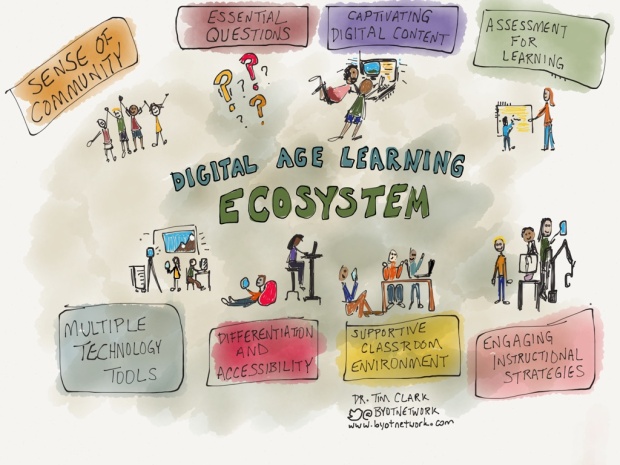
This is an interesting article on the Components of a Digital Age Learning Ecosystem. It gives a short explanation of each of the ecosystem pieces as the author sees them.
If you are interested in discussing this topic, or anything else related to the use of technology in your class, please let Penney Matos know!
Monday, October 12, 2015
Lesson Technology Integration vs. Blended Learning
At a training last week I came across this video that beautifully explains the difference in and importance of Lesson Technology Integration and Blended Learning.
If you would like to talk about how Technology Integration and/or Blended Learning in your class, please see Penney Matos!
Subscribe to:
Comments (Atom)