Showing posts with label byod. Show all posts
Monday, January 14, 2019
Station Rotation Alternatives
Station rotations have been around in education for ages. The newest take incorporates learning with technology (instructional videos, interactive simulations, video recording to show understanding, etc). If you have concerns about the logistics of integrating station rotations in your class, see this article for ideas!
Read more.
Monday, August 6, 2018
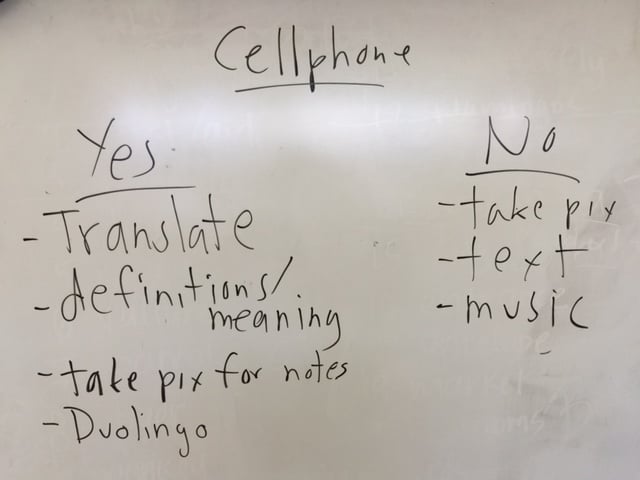
BYOD: A Cell Phone Policy that Works
As a new school year begins, teachers everywhere try to wrap their heads around how cell phones will be handled in their classroom this year. Please consider this blog post: A Cell Phone Policy that Works. It's in line with telling students what they CAN do instead of what they can't do and seems to be much more accepted by students.
Monday, January 16, 2017
Dealing with Digital Distractions in the Classroom
Common Sense Education has compiled this collection of resources to help with managing digital devices in a classroom. Take a look at what they have to offer! Read more
Monday, September 26, 2016
5 Video Tutorials to Teach about Online Safety
Monday, September 19, 2016
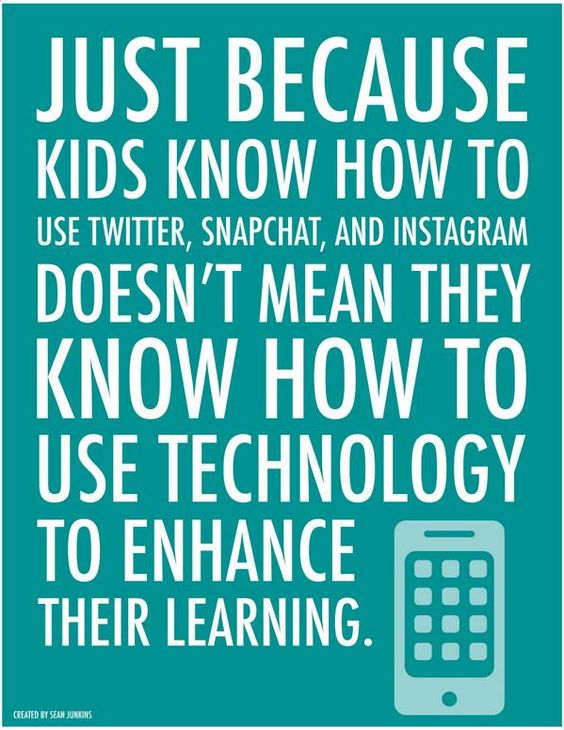
Do We Need to Teach Students to Use Technology?
Saturday, July 9, 2016
What is Digital Citizenship?
As educators are asked and expected to incorporate Digital Citizenship into their classes, it helps to first understand, "What is Digital Citizenship?". Read more.
Monday, May 23, 2016
CISD's 10 Must-Do's Before Giving a Kid an iPhone or iPod
If you have children at home, I highly recommend you check out CISD's post 10 Must Do's Before Giving a Kid an iPhone or iPod. It includes several fabulous tips that everyone should know about!
Monday, May 9, 2016
BYOD Activities that Work
Help keep your students engaged these last few weeks of school. Check out this list of BYOD Activities That Work. As always, if you would like any help with any of these tools or ideas, please contact Penney Matos!
Google Slides Q & A -- Talk with your audience, not at them
Google Slides recently added a Q & A feature, allowing audience members to be active participants in presentations. Check out this blog post on the new feature.
If you or your students present from an iPad or iPhone, check out this article.
Article: What Educators Need to Know About Technology Addiction
Common Sense Media recently published an article titled "What Educators Need to Know about Technology Addiction". It includes a summary of recent survey findings and some suggestions of what can be done. If you're for or against technology use in the classroom, you should take a look. This is a real problem.
Monday, April 25, 2016
Article: 4 Reasons That Technology Might Not Be Helping Them Learn
I will be the first to tell you that technology is not always the best tool for the job. This article, 4 Reasons That Technology Might Not Be Helping Them Learn hits the nail on the head.
The reasons they list include:
1) You're using technology for technology's sake.
2) The technology distracts from understanding.
3) The teacher is still the audience.
4) You're neglecting authentic student voice & choice.
Read more...
Monday, March 14, 2016
Formative Assessment Apps & Tips
Common Sense Graphite put together this short list of apps and a few resources that are helpful for formative assessment in your classroom. They recommend these apps: Poll Everywhere, Socrative, Kahoot or Formative.
I also ran across this article from Ms. EdTechie listing many more formative assessment options.
If you would like to talk about any of these apps or other formative assessment options, please let me know!
Monday, February 29, 2016
Regulate Cell Phone Use in Schools
Oftentimes teachers have trouble figuring out the best way to manage cell phone usage in their classrooms and students often suffer separation anxiety when they're not fully connected. This article gives some helpful suggestions to help with both, teacher management and student anxiety.
Monday, February 1, 2016
Kahoot: Ghost Mode
Kahoot is an assessment tool that can be used with BYOD or school owned devices.
How ghost mode works:
First, run a Kahoot game as you normally would. At the end of the game select "ghost mode" to run the game again. In ghost mode students play against their own scores from the previous game. Then when you run the game students will be competing against the "ghost" version of themselves from the previous running of the game. For example, I play a game as a student in the first running of a game then in the second running of the game I'll be competing against my previous score as well as those of my classmates.
This article explains all about it.
Monday, November 2, 2015
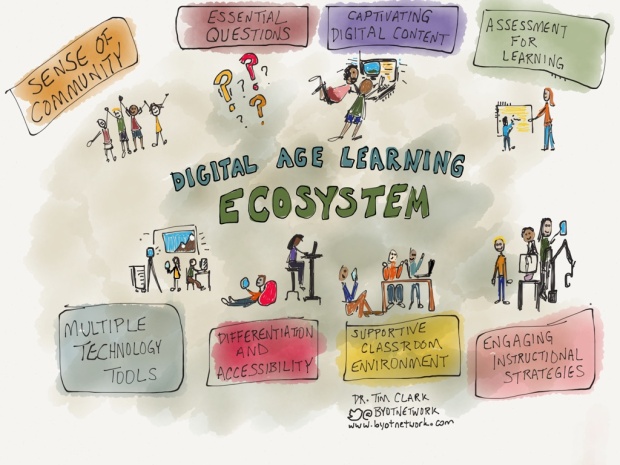
Components of a Digital Age Learning Ecosystem
This is an interesting article on the Components of a Digital Age Learning Ecosystem. It gives a short explanation of each of the ecosystem pieces as the author sees them.
If you are interested in discussing this topic, or anything else related to the use of technology in your class, please let Penney Matos know!
Monday, September 21, 2015
Graphite's Top Picks for Persuasive and Argumentative Writing
Common Sense Media's Graphite
These products include skills-builders, practice tools, and writing communities, all of which help students -- especially those in middle and high school – understand the mechanics and art of crafting writing that communicates a point well.
Labels:
apps,
assessment,
byod,
common sense media,
English,
websites
Monday, August 31, 2015
Additional BYOD Signs
FISD students at the CTE Center have created some additional BYOD signs that can be displayed in your classroom. Check them out!
Tuesday, May 12, 2015
Desmos: Explore Math

Desmos
What it is: Desmos is an incredibly fast online calculator that can graph any imaginable function. It also allows users to add sliders, do regressions, and plot whole data tables, among other things.
Who would love it: Anyone learning math, from middle and high school through graduate school and beyond. Also great for teachers.
Why it’s good: Desmos can be used on any computer or tablet, completely free of charge, and does not even require a download. It seamlessly creates beautiful visual representations and animations, and it allows users to save and share graphs they've created. Desmos makes complex math — whether theoretical or applied — fun, interactive, and accessible.
Why it’s relevant: For many students and math enthusiasts who can't afford graphing calculators, Desmos is leveling the playing field. It is also, in Tech Crunch's words, "platform-agnostic" — so anyone with a computer or tablet can use it anytime. In addition, Desmos is supporting the push toward online textbooks and leading many students to spend their free time creating cool graphs and cultivating a love of math — something that's especially crucial given the growth in STEM-related careers.
Something you didn’t know: The site has an engaging series of classroom activities for teachers. One of these is the Function Carnival, which enables students to watch a video, create a graph, and have that model transformed into an animation. Another is Des-Man, in which students do math artistically — they draw faces with graphs by using domain and range restrictions.
Wednesday, April 15, 2015
Managing Student Cell Phone use in Class
Check out this article on Managing Student Cell Phone use in Class. Though the article is based on an ESL class, the idea can be used in all classrooms leading to buy-in from students.
Thursday, April 9, 2015
Top Tech Tools for Formative Assessment
Common Sense Media's Graphite put together their list of Top Tech Tools for Formative Assessment.
**Note: Infuse Learning is unfortunately closing doors in the coming weeks so skip that one.
There is also an online BYOD Assessment Tools workshop that you can take this summer. Sign up for either Mon, June 15 - Mon, June 29 or Mon, July 27 - Mon, Aug 10
Subscribe to:
Comments (Atom)