
Showing posts with label iPad. Show all posts
Showing posts with label iPad. Show all posts
Monday, March 26, 2018
Veescope: Green Screen Images and Video
If you're looking for a free green screen app, check out Veescope! Currently it's only available in iTunes. There is a watermark on the video/picture but it's free!
If students have access to a Mac (desktop Mac or MacBook, not iPhone or iPad), iMovie also does green screen.

Monday, January 2, 2017
30 Ed-Tech Apps to Inspire Creativity and Creation

These 30 Ed-Tech Apps to Inspire Creativity and Creation are recommended by librarians so the list has got to be good! It includes:
- Adobe Capture
- Adobe Spark
- Photo Editor by Aviary
- Edpuzzle
- Flipster
- Goodreads
- Kiosk
- LEGO Movie Maker
- Lucidchart
- Nearpod (highlighted at the Fall Into Great Ideas expo last October)
- Quizlet
- Shadow Puppet
- Skitch
- Storyboard That
- What Was There
- and many others...
Monday, September 12, 2016
Alternatives for TechSmith's Snag-it, Knowmia, Screenchomp

Richard Byrne at FreeTech4Teachers has come up with a list of alternatives for TechSmith's discontinued Snag-it's Chrome extension, and Knowmia & Screenchomp iPad apps. Click to read.
Monday, May 23, 2016
CISD's 10 Must-Do's Before Giving a Kid an iPhone or iPod

If you have children at home, I highly recommend you check out CISD's post 10 Must Do's Before Giving a Kid an iPhone or iPod. It includes several fabulous tips that everyone should know about!
Monday, October 12, 2015
65 Things You Can Do in iOS 9 That You Couldn't Do in iOS 8
If you have an iPhone, iPad or iPod Touch, check out 65 Things You Can Do in iOS 9 That You Couldn't Do in iOS 8.

My favorites are the iPad options for Slide Over, Split View, and Picture-in-Picture at the bottom of the article.
Monday, September 21, 2015
Help... I'm out of storage on my iPhone!
Carroll ISD put together a great article full of suggestions on how to save space on your iPhone.

Android users, sorry, I don't have an article for you now but if I come across one I'll share!
Friday, February 6, 2015
Apple TV Settings for the Classroom

If you are interested in using an Apple TV along with your personal iPad, iPhone, iPod Touch or MacBook, please check out Apple TV Settings for the Classroom for lots of tips, tricks and things to be aware of.
Friday, January 23, 2015
Vidra: Video Creator iPad App

If you're looking for an iPad app to easily create explainer and other types of videos, check out the new Vidra app.
It’s A LOT like Adobe Voice.
- Make individual slides and add your voice to each.
- Large image / clip art library or upload your own
- Sound library for background music or use your own.
- Automatically combines slides into a single video.
But what makes this app better(?) is that the video will
export to your iPad’s Photo Album and/or Youtube. So the final video
isn’t stuck only on a separate website like Adobe Voice.
- Also, it doesn’t require an account.
- You can draw your own sketches.
- Text boxes are more traditional and have more space.
Monday, January 5, 2015
Apple Maps Fly-Over Cities
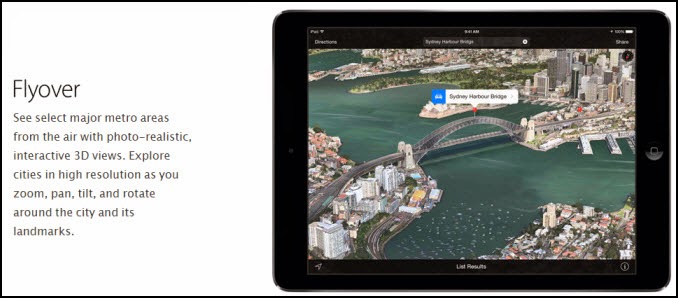
If you have access to an iDevice, check out Apple's Maps Flyovers!
A list of cities and landmarks can be found here.
1) Open Apple's Maps app.
2) Search for a listed city or landmark.
3) Click "Start Flyover" on the top.
Tuesday, November 11, 2014
Nearpod FREE Content

Nearpod allows teachers to construct presentations using the Nearpod website and deliver instruction to students by pushing content out to multiple devices at once. The teacher controls the presentation from a master device or computer, while students follow along on their own devices or computers. It's compatible with any mobile device (iTunes, Android, Windows), Chromebook, Mac or PC.
Nearpod has a gallery of pre-mad content that you can download, modify and use. Many, but not all, of this content is free.
Wednesday, October 29, 2014
Polleverywhere's New Question Library

Polleverywhere has partnered with Boundless Learning to offer a high level Question Library including questions from 22 different subject areas.
Find a question you like, select it and go!
Tuesday, October 21, 2014
5 Ways to Use Remind (101) with Your BYOD Class

Remind (formerly Remind 101) can be used during class to engage your students!
Thursday, September 25, 2014
New in iOS8

Check out Tony Vincent's article and video highlighting helpful tips for teachers and students in Apple's new iOS8.
Tuesday, September 23, 2014
Apps on CHS iDevices

We have sets of 15 iPad2s, 5 iPad1s, 15 iPod Touch Gen 3 (no camera), and 4 iPod Touch Gen 4 available for checkout through Eduphoria's Factilities & Events. The set of 15 iPads are picked up from Penney's desk in the South Workroom and all other devices are picked up from the Library.
See http://bit.ly/chsapps to view a list of apps that are already accessible through our CHS iDevice account.
See this handout for tips on evaluating apps for classroom use.
Monday, September 22, 2014
FISD's Secondary Tech Facilitator's Pinterest Boards

The Secondary FISD Technology Integration Facilitators maintain a set of helpful Pinterest boards. They are broken into categories where "apps" means iTunes apps and "tools" means websites.
Free Technology for Teachers written by Richard Byrne

Free Tech 4 Teachers (best in Chrome) is one of my all time favorite resources. Richard Byrne is a former high school social studies teacher who now spends his time finding awesome classroom resources for all content areas.
Tech and Learning website

Tech & Learning has tons of ideas and tools for ed tech leaders. If you're interested in a technology topic, chances are you'll be able to find information on it here.

Subscribe to:
Comments (Atom)